
Perplexity isnt new. The hook is it links to the web articles its sourced the answer from. So you can (somewhat) vet the information isnt a hallucination or dog into the website for more info.
- 1 Post
- 36 Comments
Joined 10 months ago
Cake day: December 17th, 2023
You are not logged in. If you use a Fediverse account that is able to follow users, you can follow this user.
Maybe I misunderstood. Are launchers more like “search” or quick lunch?
I was looking for a start menu replacement.

Playing along for Mint/Cinnamon suggestions. Already using the Cinimenu (or whatever it is) but its still not “it”.

 5·9 days ago
Only for groups? Why thing else has worked fine for the 9months I’ve had signal.
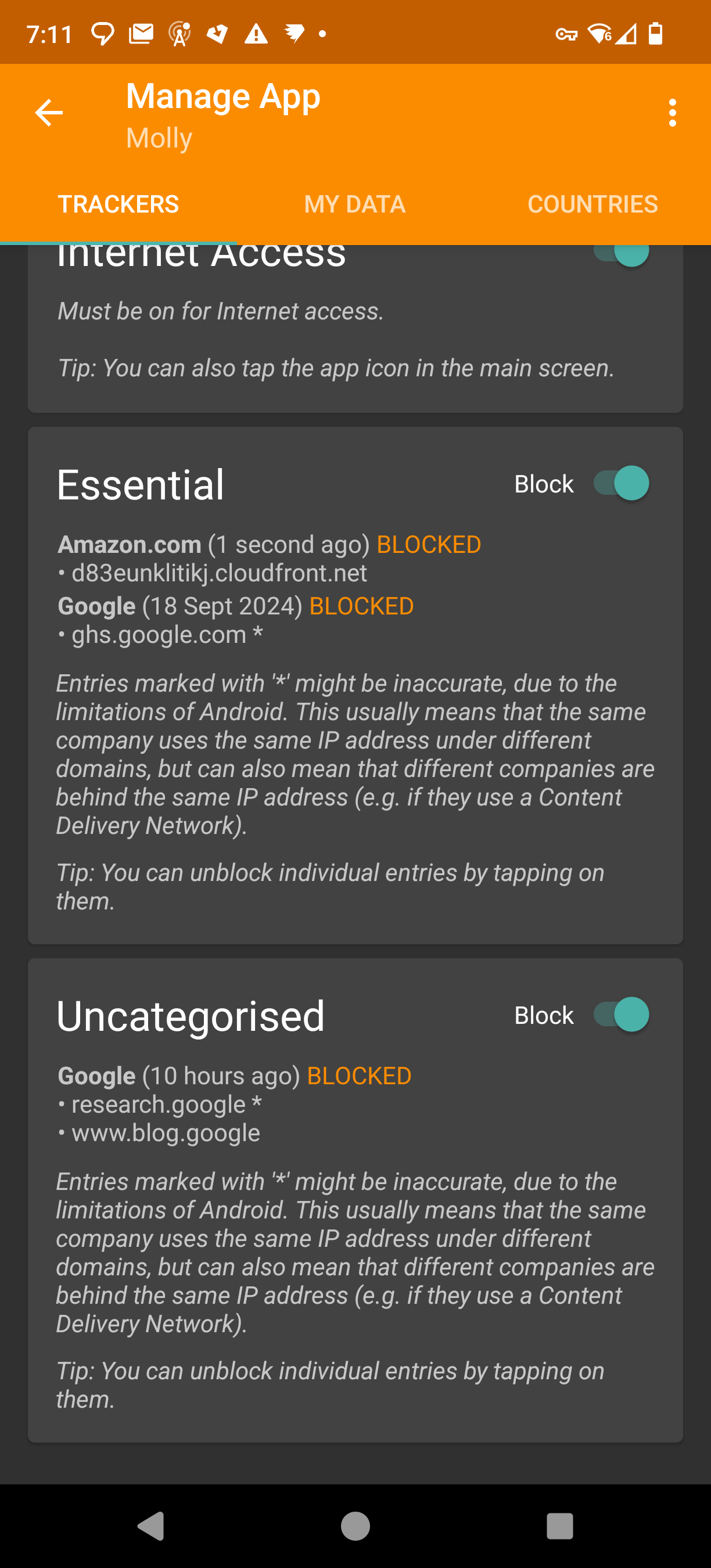
Tracker Control is blocking me from joining. Weird that Molly (its a hardened signal fork) is showing amazon is being contacted when trying to join the group.
I can unblock it but its weird. I also noticed the other domains its been trying to (unsuccessfully) contact.
Probably not the place to ask, but. Say In a n00b and have Arch (EndeavourOS BTW) on a 15+ year old laptop. Everything works fine hardware wise. Software is fairly basic web, Inkscape, LibreOffice.
Do I really need all the latest Arch updates? Or can I just do an update say every 6 months?
The sync looks to be a version of KDE connect. That I have running on Mint. I think I had to install it from the Mint software GUI though.
Zorin does look cool though. As easy as it is Mint/Cinnamon is a bit ugly out of the box.
How does this compare for a user who “just wants things to work without terminal/CLI”.
I’ve landed on Mint after trying a few other distros.
What is the videos and games are you seeing water marks in?
I was trying for this. Probably should have have just pasted it.

Why use more words when less is easier.
Lol. I’m not a Mac person. Airbook? The thin ones.
Is plasma big screen really an option? Id like to install it on a desktop to act as a android tv. Launch Stremio, YT and maybe one or two other apps/websites. Easy big tile navigation with remote (flirc).
It’s in dev since 2020. The images hosted on the site are bit for any of my hardware. It says theres a Debian package. Installed that though LMDE but it was horrible. Somone mentioned Kububtu can install it with apt, but its not listed. Think I’ll give up.
 2·1 month ago
I like the idea. In regards to lemmy and its instances (so I guess a smaller Scale to what your suggesting … Though I still don’t fully get the fediverse).
I did something similar when picking a Lemmy instance. What was the instance that had defederated others the least. There was a git page somewhere that listed them all.
On the flip side I’ve heard a notion that no one single instance should become the “main” instance. Probably with your suggestion new users would gravitate to the big circle. Thus making it the “default”. But maybe it’s different when looking outside of lemmy instances to the wider fediverse.
For me it’s the wiki. Arch just explaining so simply. Searching an issue for LMDE just lead to forums. And the Debian or Ubuntu wikis don’t seem as good as arch.
Plus must searches for <other distro> issue seem to lead to forums and random “run this code”. All arch searches led back to the Wiki. All hail the wiki.
But srsly. I feel like I’m LEARNING Linux with arch. Rather than just running fixes for the other distros.
This. In my recent experience on one laptop. Arch (Endevour OS btw) installed fine.
But LMDE would not boot. I got a system disk missing error every time after install. So much playing with EUFI settings in BIOS, boot back to live disl, multiple re installs, GRUB repair, remake the ISO (ISO was fine, installed on another PC with no issues). Gave up. Just could not boot to the OS.
Install normal mint. No issues.
And past the install? Bluetooth dongle works fine on arch, but so many issues on mint.
WiFi dongle A works on arch, but not mint. WiFI dongle B dosenr work on arch but does work on mint. Took me a while to work thst one out.
Headphpnes have some weird echo back to me when mic is on. Use pipewire config from archwiki. Worked, but reduced qualoty. Tried a few other configs. Didn’t work. Must have broke something coz now the original config dosnt work. So will just deal with echo.
0 of these issues on windows. And 0 likely your regular user can easily swap to Linux.
Will stay on arch tho. Fuck
spezwindows.

I wish I could block keywords in images. Can’t fucking escape it. And my country is owned by the
queenking.

SmartTube self updates BTW. So once its loaded you dont need to do it again. Same with S0und for Twitch.